
summarize Quick Overview
info About This Game
article Information
Project Restoration delivers engaging gameplay for players exploring quick browser gaming sessions. If this game matched your style, you may enjoy more Casual Online experiences.
Access Project Restoration now to join the game. To continue the challenge, try experiencing Plants vs Brainrots or Castle Craft. Game Online Free
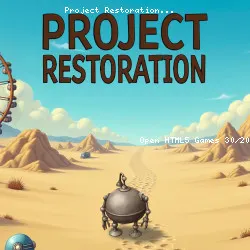
Project Restoration is a cozy farm-adventure game set in a distinctive post-apocalyptic world. After 200 years of slumber, three charming robots awaken to find a humanless Earth filled with secrets and decay. With your help, they’ll revive nature, rebuild civilization, and uncover the truth behind humanity’s disappearance. Grow crops, gather resources, construct workshops, and bring warmth back to a forgotten world one vintage furnishing at a time.
Features
- Farm and adventure blend classic growing and crafting with a deep exploration of ancient ruins
- 56 vibrant locations, including wastelands, bunkers, megacities, radioactive forests, icy mazes, and even a crashed starship
- Over 1,000 quests filled with puzzles, pests, and story arcs that unravel the fate of humankind
- Three robot heroes and 30 NPCs, each with unique personalities, skills, and humorous dialogue
- Play with friends by trading gifts, visiting neighbors, and joining cooperative events
- Flexible base customization with hundreds of décor options from steampunk gear to retro lamps
tune Game info
code Tech & platforms
sell Tags
sports_esports Controls
Controls
PC Controls
- Left-click = select objects, harvest crops, start production, interact with characters, and move between points of interest.
- Hold left-click on an object (e.g., building, decor, etc.) = enter edit mode to freely reposition buildings, decorations, and other objects within the location.
- Drag the left-click = smoothly pan the camera across the map or scroll through interface lists.
Mobile Controls
- Single tap = perform primary actions such as collecting, building, opening menus, or initiating dialogue.
- Hold on to an object (e.g., building, decor, etc.) = activate Edit Mode for free placement and movement of objects.
- Swipe = Smoothly pan the camera or scroll through interface lists.
help FAQ
star Ratings
8.2K ratings
Thank you for your rating!
Your feedback has been recorded.
Rate This Game
apps Related Games

Jetpack Joyride
Casual • One Button
Striker Dummies
Action • 2 Player

Factory Balls Forever
Puzzle • Logic
Just Park It 12
Driving • Parking
MiniBattles
Casual • One Button
Bubble Trouble
Casual • Mobile

Ducklings
.io • Water

Ludo Hero
Puzzle • Mobile
trending_up Trending
GeoQuizle
Puzzle • Mobile
Silly Walkers
Action • 3D
Moscow Metro Driver 3D
Driving • Train
Color Fill 3D
Puzzle • Mobile
Mini Flips
Casual • Mobile

Bacteria
Action • 3D