
summarize Quick Overview
info About This Game
article Information
Players browsing Free Games often discover Hex Sense thanks to its smooth browser gameplay sessions. If this game caught your attention, the Game Puzzle category has plenty more to offer.
Hex Sense offers a lightweight and accessible experience for players exploring Web Games and Free Games Online. Built with HTML5 technology, the game loads instantly on Opem Html5 Games and delivers responsive mechanics. Discover Hex Sense on Opem Html5 Games right now and begin your entertainment journey. Fans of the genre will likely enjoy Dishwasher and Flywheel Incremental: Reforged. Games At School
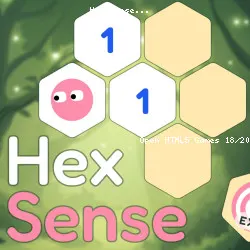
Guide Mochi across risky hex lands to find all of his friends. His hex sense lets him read clues about how many hazards are nearby and find a safe path through the land. Reveal tiles, flag traps, and guide brave Mochi to his friends. Cross several unique chapters filled with new kinds of hazards and clues.
Hex Sense is a minesweeper-style puzzle played on a field of hex tiles. We are constantly working on adding more chapters, so the adventure continues.
Logical puzzle games like Hex Sense are not just fun, they are also great for your brain. Regularly playing logic-based games can help improve memory, sharpen focus, and keep your mind active and engaged, especially as you get older.
tune Game info
code Tech & platforms
sports_esports Controls
Controls
Each level starts with a mix of open and closed tiles. Your goal is to reach the Exit tile without stepping on a hazardous tile. To do that, you need to use logic, clues, and a few helpful tools. The most important thing is to make sense of the numbers that show how many hazardous tiles surround the tile with a number.
Movement:
- Point and tap/click to move Mochi to a tile.
- When you move to a closed tile, it opens and reveals what’s inside.
- If the tile contains a hazard, the game ends.
- You can move freely through open tiles.
- You can only move to closed tiles that are next to the ones you've already opened.
Flagging tiles:
- Use right mouse click or long tap to flag a tile as dangerous.
- Alternatively, you can tap the flag button and then the tile you want to flag
Revealing tiles:
- Use the Eye button to reveal what’s inside a closed tile without stepping on it.
Some levels require you to find a key to unlock the Exit. A progress bar shows how many safe tiles you’ve opened. The more you open, the more stars you get. If you open all safe tiles you get 3 stars.
help FAQ
star Ratings
5.7K ratings
Thank you for your rating!
Your feedback has been recorded.
Rate This Game
apps Related Games
Maze Planet 3D
Puzzle • 3D

Jetpack Joyride
Casual • One Button

Factory Balls Forever
Puzzle • Logic

Just Park It 12
Driving • Parking
Getaway Shootout
Action • 2 Player
MiniBattles
Casual • One Button
Bubble Trouble
Casual • Mobile

Ducklings
.io • Water
trending_up Trending
GeoQuizle
Puzzle • Mobile
Silly Walkers
Action • 3D

Moscow Metro Driver 3D
Driving • Train
Color Fill 3D
Puzzle • Mobile

Mini Flips
Casual • Mobile

Bacteria
Action • 3D