
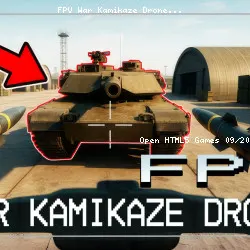
info About This Game
article Information
FPV War Kamikaze Drone delivers smooth gameplay within the growing ecosystem of HTML5 browser games. If you're enjoying this experience, try exploring more Action games.
Join FPV War Kamikaze Drone and enjoy smooth gameplay. Shoot and Drive and Ages: Build & Craft are suitable titles to play next if you are already familiar with FPV War Kamikaze Drone.
FPV War: Kamikaze Drone is a high-tech combat simulator that puts you in control of modern FPV drones across intense tactical missions. Experience the action through a realistic first-person view, enhanced by explosive visuals and immersive ragdoll physics, placing you right at the heart of the battlefield. Control combat FPV drones to destroy enemy vehicles and infantry using a mix of strategic planning, precision piloting, and a variety of powerful weapons. Every map challenges you to maximize your efficiency and secure victory.
Features
- Variety of maps, including five distinct locations like a training center, factory, and military convoy
- Diverse enemies, including buggies, trucks, tanks, and air defense systems
- Two combat drone types: Kamikaze for high-impact strikes and Striker for precision attacks
- Weapon customization allows you to select the right payload for each mission
- FPV mode with immersive, realistic controls from the drone’s perspective
- Stunning visual effects and ragdoll physics for a fully dynamic experience
- Recon view lets you switch to a surveillance drone to observe the action after each strike
download Get the app
tune Game info
code Tech & platforms
sports_esports Controls
Controls
PC Controls
Kamikaze Drone Controls
- WASD / drag left-click on the left screen = move
- Arrow keys / drag left-click on the right screen = tilt drone
Striker Drone Controls
- WASD / drag left click on the left screen = move forward, left, backward, and right
- Up-down arrow key / drag left-click on the right screen = move upward and downward
- Left-right arrow key / drag left-click on the right screen = rotate camera view to the left and right
- Drag left-click on the left slider = zoom in / out camera view
- Drag left-click on the right slider = tilt up / down the camera view
Mobile Controls
Use the in-game joysticks to play the game.
help FAQ
star Ratings
8K ratings
Thank you for your rating!
Your feedback has been recorded.
Rate This Game
apps Related Games
Maze Planet 3D
Puzzle • 3D
Jetpack Joyride
Casual • One Button
Striker Dummies
Action • 2 Player
Crazy Pig Simulator
Action • 3D

Just Park It 12
Driving • Parking
Getaway Shootout
Action • 2 Player
Gun Mayhem 2
Action • 2 Player
MiniBattles
Casual • One Button
trending_up Trending
GeoQuizle
Puzzle • Mobile
Silly Walkers
Action • 3D
Moscow Metro Driver 3D
Driving • Train
Color Fill 3D
Puzzle • Mobile

Mini Flips
Casual • Mobile

Bacteria
Action • 3D